 CanbiZ (MickLesk)
dd46dd2d87
CanbiZ (MickLesk)
dd46dd2d87
* fix(zammad): configure Elasticsearch for LXC container startup

- Set discovery.type: single-node (required for single-node ES)
- Set xpack.security.enabled: false (not needed in local LXC)
- Set bootstrap.memory_lock: false (fails in unprivileged LXC)
- Add startup wait loop (up to 60s) to ensure ES is ready before
  Zammad installation continues

Fixes #12301-related recurring Elasticsearch startup failures

* refactor(api): eliminate duplicate traps, harden error handling & telemetry

Phase 1 - Structural:
- Remove api_exit_script() and 5 inline traps from build.func
- error_handler.func is now the sole trap owner via catch_errors()
- Update api.func comment reference (api_exit_script -> on_exit)

Phase 2 - Quality:
- Add stop_spinner() + cursor restore to error_handler(), on_interrupt(),
  on_terminate(), on_hangup() to prevent spinner/cursor artifacts
- Enhance _send_abort_telemetry() with error text (last 20 log lines),
  duration calculation, and 2 retry attempts (was fire-and-forget)
- Harden json_escape() to also strip DEL (0x7F) character

* fix(build): show spinner during post_update_to_api to prevent Ctrl+Z abort

post_update_to_api can take up to 33 seconds worst-case (3 curl attempts
x 10s timeout + sleep delays). Without any terminal output during this
time, users think the script is stuck and press Ctrl+Z, which prevents
the recovery menu from ever appearing.

Add msg_info spinner before both post_update_to_api calls in the failure
path (initial report + final force retry after recovery menu).

* fix(build): prevent SIGTSTP from killing recovery dialog

- Replace msg_info/stop_spinner with plain echo for telemetry reporting
  The background spinner process in non-interactive shells (bash -c)
  can trigger SIGTSTP, stopping the entire process group before the
  recovery dialog appears. Plain echo avoids this.

- Add trap '' TSTP at failure path entry to ignore suspension signals
  Prevents Ctrl+Z or terminal-related SIGTSTP from interrupting the
  recovery menu. Restored with trap - TSTP before exit.

- Root cause: msg_info starts a background process (spinner &) that
  is not properly detached in non-interactive shells where job control
  (set -m) is OFF. The disown builtin has no effect without job
  control, leaving the spinner in the same process group. This can
  cause terminal I/O conflicts during the 33-second post_update_to_api
  retry window, resulting in [2]+ Stopped.

* fix(test): initialize colors and remove illegal local in test harness

- Call load_functions() after sourcing core.func to initialize
  color/formatting/icon variables (RD, GN, YW, CL, TAB, etc.)
- Remove 'local' keyword from top-level scope (not inside function)
- Default REPO_SOURCE to ref_api instead of main

* chore: remove test-recovery-dialog.sh from branch

* Revert "fix(zammad): configure Elasticsearch for LXC container startup"

This reverts commit 10e450b72f.

* fix(build): show telemetry status only in verbose mode

Telemetry reporting is an implementation detail that doesn't help
the user during failure recovery. Wrap echo statements with
VERBOSE check so they only appear when verbose mode is enabled.

Proxmox VE Helper-Scripts
A Community Legacy in Memory of @tteck






Simplify your Proxmox VE setup with community-driven automation scripts
Originally created by tteck, now maintained and expanded by the community

🎯 Key Features
⚡ Quick SetupOne-command installations for popular services and containers |
⚙️ Flexible ConfigSimple mode for beginners, advanced options for power users |
🔄 Auto UpdatesKeep your installations current with built-in update mechanisms |
🛠️ Easy ManagementPost-install scripts for configuration and troubleshooting |
👥 Community DrivenActively maintained with contributions from users worldwide |
📖 Well DocumentedComprehensive guides and community support |
🔒 SecureRegular security updates and best practices |
⚡ PerformanceOptimized configurations for best performance |
📋 Requirements
🖥️ Proxmox VEVersion: 8.4.x | 9.0.x | 9.1.x |
🐧 Operating SystemDebian-based with Proxmox Tools |
🌐 NetworkInternet connection required |
📥 Getting Started
Choose your preferred installation method:
Method 1: One-Click Web Installer
The fastest way to get started:
- Visit helper-scripts.com 🌐
- Search for your desired script (e.g., "Home Assistant", "Docker")
- Copy the bash command displayed on the script page
- Open your Proxmox Shell and paste the command
- Press Enter and follow the interactive prompts
Method 2: PVEScripts-Local
Install a convenient script manager directly in your Proxmox UI:
bash -c "$(curl -fsSL https://raw.githubusercontent.com/community-scripts/ProxmoxVE/main/ct/pve-scripts-local.sh)"
This adds a menu to your Proxmox interface for easy script access without visiting the website.
📖 Learn more: ProxmoxVE-Local Repository
💬 Join the Community
💬 DiscordReal-time chat, support, and discussions 
|
💭 DiscussionsFeature requests, Q&A, and ideas 
|
🐛 IssuesBug reports and issue tracking 
|
🛠️ Contribute
💻 CodeAdd new scripts or improve existing ones |
📝 DocumentationWrite guides, improve READMEs, translate content |
🧪 TestingTest scripts and report compatibility issues |
💡 IdeasSuggest features or workflow improvements |
👉 Check our Contributing Guidelines to get started
❤️ Support the Project
This project is maintained by volunteers in memory of tteck. Your support helps us maintain infrastructure, improve documentation, and give back to important causes.
🎗️ 30% of all donations go directly to cancer research and hospice care

Every contribution helps keep this project alive and supports meaningful causes
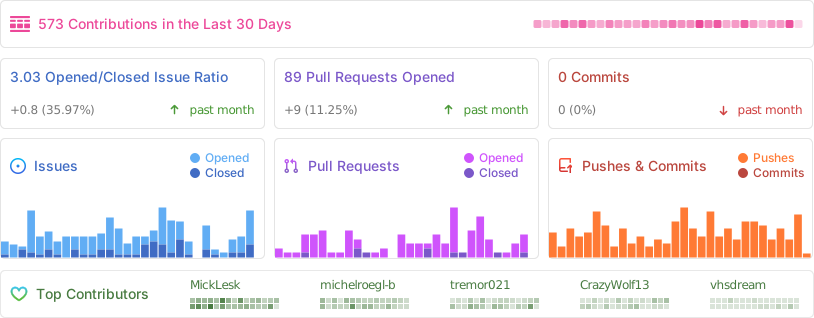
📈 Project Statistics
📜 License
This project is licensed under the MIT License - feel free to use, modify, and distribute.
Proxmox® is a registered trademark of Proxmox Server Solutions GmbH