 CanbiZ (MickLesk)
5dc244a8c1
CanbiZ (MickLesk)
5dc244a8c1
* Standardize exit codes and add mappings

Replace generic exit 1 usages with specific numeric exit codes and add corresponding explanations to the error lookup. This commit updates multiple misc/* scripts to return distinct codes for validation, Proxmox/LXC, networking, download and curl errors (e.g. 103-123, 64, 107-120, 206, 0 for explicit user cancels). It also updates curl error handling to propagate the original curl exit code and adds new entries in explain_exit_code and the error handler to improve diagnostics.

* Set exit code 115 for update_os errors

Change exit status from 6 to 115 in misc/alpine-install.func's update_os() error handlers when failing to download tools.func or when the expected functions are missing. This gives a distinct exit code for these specific failure cases.

* Add tools/addon exit codes and use them

Introduce exit codes 232-238 for Tools & Addon scripts in misc/api.func and misc/error_handler.func. Update addon scripts (tools/addon/adguardhome-sync.sh, tools/addon/copyparty.sh, tools/addon/cronmaster.sh) to return specific codes instead of generic exit 1: 238 for unsupported OS and 233 when the application is not installed/upgrade prerequisites are missing. This makes failures more descriptive and aligns scripts with the central error explanations.

* Standardize exit codes in exporter addons

Unify exit codes across exporter addon scripts: return 238 for unsupported OS detections and 233 when an update is requested but the exporter is not installed. Applied to nextcloud-exporter.sh, pihole-exporter.sh, prometheus-paperless-ngx-exporter.sh, and qbittorrent-exporter.sh to make failure modes distinguishable for callers/automation.

* Use specific exit codes in addon scripts

Replace generic exit 1 with distinct exit codes across multiple addon scripts to enable finer-grained error handling in automation. Exit codes introduced: 10 for Docker/Compose missing or user-declined Docker install, 233 for "nothing to update" cases, and 238 for unsupported OS cases. Affected files: tools/addon/arcane.sh, coolify.sh, dockge.sh, dokploy.sh, filebrowser-quantum.sh, filebrowser.sh, immich-public-proxy.sh, jellystat.sh, runtipi.sh.

* Use specific exit codes in addon scripts

Replace generic exit 1 with specific exit codes across multiple addon scripts to improve error signaling and handling. Files updated: tools/addon/add-netbird-lxc.sh (exit 238 on unsupported distro), tools/addon/add-tailscale-lxc.sh (treat user cancel as exit 0), tools/addon/glances.sh (exit 233 when not installed), tools/addon/komodo.sh (distinct exits for missing compose, legacy DB, backup/download failures, docker checks), tools/addon/netdata.sh (distinct exits for unsupported PVE versions, OS/codename detection, repo lookups), and tools/addon/phpmyadmin.sh (distinct exits for unsupported OS, network/download issues, package install/start failures, and invalid input). These changes make failures easier to identify and automate recovery or reporting.

* Use specific exit codes in PVE scripts

Replace generic exit 1 with distinct exit codes across tools/pve scripts to provide clearer failure signals for callers. post-pve-install.sh now returns 105 for unsupported Proxmox versions; pve-privilege-converter.sh uses 104 for non-root, 234 when no containers, and 235 for backup/conversion failures; update-apps.sh maps backup failures to 235, missing containers/selections to 234 (and UI cancellations to 0), missing backup storage to 119, and returns the actual container update exit code on failure. These changes improve diagnostics and allow external tooling to react to specific error conditions.

* Standardize exit codes and behaviors

Adjust exit codes and abort handling across multiple PVE helper scripts to provide clearer outcomes for automation and interactive flows. Changes include:

- container-restore-from-backup.sh, core-restore-from-backup.sh: return 235 when no backups found (was 1).
- fstrim.sh: treat user cancellation of non-ext4 warning as non-error (exit 0 instead of 1).
- kernel-clean.sh: treat no selection or user abort as non-error (exit 0 instead of 1).
- lxc-delete.sh: return 234 when no containers are present; treat no selection as non-error (exit 0).
- nic-offloading-fix.sh: use specific non-zero codes for root check and tool install failures (exit 104, 237) and 236 when no matching interfaces (was 1).
- pbs_microcode.sh, post-pmg-install.sh, post-pbs-install.sh: use distinct exit codes (232 and 105) for detected VM/PVE/unsupported distro conditions instead of generic 1.

These modifications make scripts return distinct codes for different failure modes and ensure user-initiated aborts or benign conditions exit with 0 where appropriate.

* Use exit 105 for unsupported PVE versions

Standardize error handling by replacing generic exit 1 with exit 105 in pve_check() across multiple VM template scripts to indicate unsupported Proxmox VE versions. Also add API exit code 226 message for "Proxmox: VM disk import or post-creation setup failed" in misc/api.func. Affected files include misc/api.func and various vm/*-vm.sh scripts.

* Use specific exit codes in VM scripts

Replace generic exit 1 with distinct exit codes across vm/*.sh to make failures more actionable for callers. Changes include: use 226 for missing imported-disk references, 237 for pv installation failures, 115 for download/extract/ISO-related failures, 214 for insufficient disk space during FreeBSD decompression, and 119 for missing storage detection. Updated scripts: archlinux-vm.sh, docker-vm.sh, haos-vm.sh, openwrt-vm.sh, opnsense-vm.sh, truenas-vm.sh, umbrel-os-vm.sh.

Proxmox VE Helper-Scripts
A Community Legacy in Memory of @tteck






Simplify your Proxmox VE setup with community-driven automation scripts
Originally created by tteck, now maintained and expanded by the community

🎯 Key Features
⚡ Quick SetupOne-command installations for popular services and containers |
⚙️ Flexible ConfigSimple mode for beginners, advanced options for power users |
🔄 Auto UpdatesKeep your installations current with built-in update mechanisms |
🛠️ Easy ManagementPost-install scripts for configuration and troubleshooting |
👥 Community DrivenActively maintained with contributions from users worldwide |
📖 Well DocumentedComprehensive guides and community support |
🔒 SecureRegular security updates and best practices |
⚡ PerformanceOptimized configurations for best performance |
📋 Requirements
🖥️ Proxmox VEVersion: 8.4.x | 9.0.x | 9.1.x |
🐧 Operating SystemDebian-based with Proxmox Tools |
🌐 NetworkInternet connection required |
📥 Getting Started
Choose your preferred installation method:
Method 1: One-Click Web Installer
The fastest way to get started:
- Visit helper-scripts.com 🌐
- Search for your desired script (e.g., "Home Assistant", "Docker")
- Copy the bash command displayed on the script page
- Open your Proxmox Shell and paste the command
- Press Enter and follow the interactive prompts
Method 2: PVEScripts-Local
Install a convenient script manager directly in your Proxmox UI:
bash -c "$(curl -fsSL https://raw.githubusercontent.com/community-scripts/ProxmoxVE/main/ct/pve-scripts-local.sh)"
This adds a menu to your Proxmox interface for easy script access without visiting the website.
📖 Learn more: ProxmoxVE-Local Repository
💬 Join the Community
💬 DiscordReal-time chat, support, and discussions 
|
💭 DiscussionsFeature requests, Q&A, and ideas 
|
🐛 IssuesBug reports and issue tracking 
|
🛠️ Contribute
💻 CodeAdd new scripts or improve existing ones |
📝 DocumentationWrite guides, improve READMEs, translate content |
🧪 TestingTest scripts and report compatibility issues |
💡 IdeasSuggest features or workflow improvements |
👉 Check our Contributing Guidelines to get started
❤️ Support the Project
This project is maintained by volunteers in memory of tteck. Your support helps us maintain infrastructure, improve documentation, and give back to important causes.
🎗️ 30% of all donations go directly to cancer research and hospice care

Every contribution helps keep this project alive and supports meaningful causes
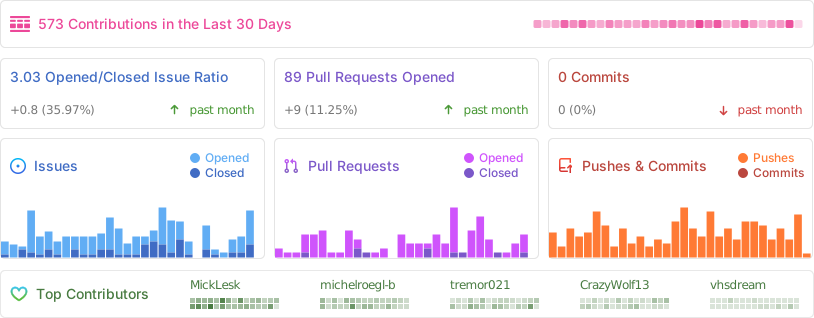
📈 Project Statistics
📜 License
This project is licensed under the MIT License - feel free to use, modify, and distribute.
Proxmox® is a registered trademark of Proxmox Server Solutions GmbH