 CanbiZ (MickLesk)
5706845d33
* Put add-tailscale-lxc's tun lines into the container, not its last snapshot

Snapshots follow a container's settings as [name] sections, so the two
lxc lines appended with >> landed in the last snapshot: pct config never
showed them, the container got no /dev/net/tun and tailscaled could not
start. The grep that skips an existing line also matched the snapshot's
copy on a second run. Check and insert them in the container's own
section.

* Keep add-tailscale-lxc's container output in the log and the trace

The install ran as a plain pct exec, so its output only reached the
terminal and every failure was reported as "pct exited with status 100"
with nothing after the step. It now runs through $STD: the output goes to
the run log, and a failure shows it and puts it in the trace. Inside the
container the helpers ran in silent mode as well, which kept apt's own
error in a log there; VERBOSE=yes prints it instead.

A failed download of core.func or tools.func was sourced as an empty
file and ended in "load_functions: command not found" (exit 127, 7 of
the 22 failed runs in four days). It now stops with exit 7 and says the
container could not download them.

* Make add-tailscale-lxc's DNS fallback trigger, and always undo it

dig +short prints its own errors (";; no servers could be reached") on
stdout, and the check counted any line that was not 127.x or 0.0.0.0 as
an address, so with a dead resolver the fallback to 1.1.1.1 never ran
and the install failed further on. Count only address lines.

The original resolv.conf was put back only after a successful install;
any failure left the container on 1.1.1.1, and a second run then saved
that as the backup. Restore it on exit.

* Do not fail add-tailscale-lxc over the tag once Tailscale is installed

pct set -tags ran last under set -e, so a container locked by a running
backup ("CT is locked (backup)", exit 255) failed the whole run after
Tailscale had been installed. The tag is cosmetic: warn with pct's
message instead. Read the tags from pct config so a snapshot's copy is
not added, and skip the tag when it is already there.

Community Scripts — Proxmox VE
One-command installations for services, containers and VMs on Proxmox VE
A community project — built on the foundation of @tteck's original work





What is this?
The canonical application scripts. More than 700 of them, covering home automation, media, networking, databases, monitoring, security and developer tooling. Paste one command into your Proxmox shell and the container or VM is built, configured and running.
A script only describes what to install. Creating the container, asking the questions and handling the errors is the job of the shared engine in core, which every script loads at start-up. The same scripts run unchanged on an Incus host through the Incus repository.
Ready-made commands for every application are on community-scripts.org.
Getting started
- Go to community-scripts.org
- Search for the service you want — Home Assistant, Nginx Proxy Manager, Jellyfin
- Copy the one-line install command from the script page
- Open your Proxmox shell and paste it
- Choose Default or Advanced and follow the prompts
Each script page lists what the container includes, the default resources and the post-install notes.
These commands run as root on your host. Every script is readable in this repository, and each script page links to its source — read it before you paste it, as you would with any installer.
How scripts work
Default picks sensible resources and asks only what it has to. Most installs finish in a few minutes.
Advanced hands you container settings, networking, storage backend and application options before anything is created.
Every container gets an update command. Type it in the container console:
update
It updates the installed application and reaches settings that would otherwise mean editing config files by hand. VM scripts have no built-in updater — use the guest's own package manager.
Requirements
| Component | Details |
|---|---|
| Proxmox VE | 8.0 – 8.4, or 9.0 – 9.2 |
| Access | Root shell on the Proxmox host |
| Network | Internet access during installation |
Virtual machine scripts need the same versions as containers.
Repository map
| Repository | Contains |
|---|---|
| core | The engine — container and VM creation, the wizard, error handling |
| ProxmoxVE (this repo) | Canonical application scripts, plus tools/pve/, vm/ and turnkey/ |
| Incus | The same scripts on an Incus host, plus Incus VMs and host tooling |
| DevScripts | Where new scripts are tested before they land here |
Layout
| Folder | Contents |
|---|---|
ct/ |
Application scripts — the command you paste |
install/ |
What each script installs inside the container |
vm/ |
Virtual machine scripts |
tools/pve/ |
Host tooling: post-install, hardware passthrough, maintenance |
turnkey/ |
TurnKey Linux appliance helper |
Application metadata — name, description, logo, tags — is managed on the website, not in this repository. Use the Report Issue link on any script page to request a change.
Testing a fork or branch
Engine and scripts resolve independently, so either can point somewhere else. Put the variable on the command itself — nothing needs exporting.
To run your own copy of the scripts:
COMMUNITY_SCRIPTS_URL=https://raw.githubusercontent.com/YOU/ProxmoxVE/my-branch \
  bash -c "$(curl -fsSL https://raw.githubusercontent.com/YOU/ProxmoxVE/my-branch/ct/debian.sh)"
A ct/ script fetched with curl cannot tell the engine where it came from, so
without that variable it would look for its install/ half upstream.
Only when you are changing the engine itself:
COMMUNITY_SCRIPTS_CORE_URL=https://raw.githubusercontent.com/YOU/core/my-branch \
  bash -c "$(curl -fsSL https://raw.githubusercontent.com/community-scripts/ProxmoxVE/main/ct/debian.sh)"
A local checkout of core wins over both — point at it with
COMMUNITY_SCRIPTS_CORE_DIR.
Contributing
This project runs on community contributions. New scripts, fixes, bug reports — all of it helps.
| I want to… | Go here |
|---|---|
| Add a new script | DevScripts — new scripts are tested there first |
| Fix or improve an existing script | Contributing Guidelines — open a PR here |
| Change how containers are built | core |
| Report a bug or a broken script | Issues |
| Request a script or a feature | Discussions |
| Report a security vulnerability | Security Policy |
| Ask a question | Discord |
Before you open a PR
- New scripts go to DevScripts, not here. PRs adding new scripts to this repository will be closed.
- Keep a PR to one fix or one feature.
- A bug that also happens on Incus is an application or engine bug — say so in the report.
- Read the Contributing Guidelines before your first PR.
Core Team
 MickLesk |
 michelroegl-brunner |
 BramSuurdje |
 CrazyWolf13 |
 tremor021 |
 vhsdream |
 asylumexp |
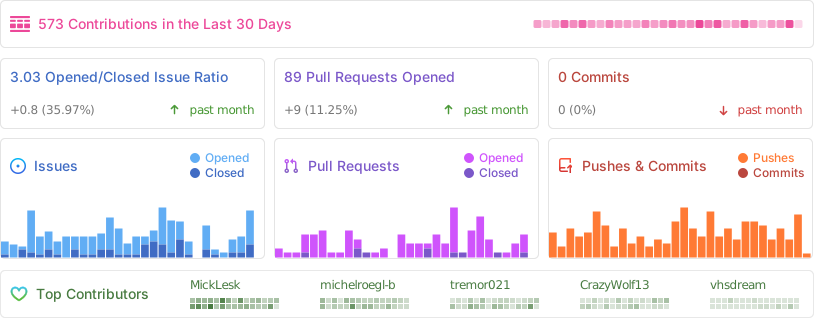
Project Activity
Support the Project
This project is maintained by volunteers. Infrastructure costs come out of pocket and the work happens in people's spare time.
30% of all donations are forwarded directly to cancer research and hospice care — a cause that was important to tteck.


License
MIT — free to use, modify and redistribute, for personal and commercial purposes. See LICENSE.
Maintained and expanded by the community · In memory of tteck
This is an independent community project. Proxmox® is a registered trademark of Proxmox Server Solutions GmbH.