 38a2fec5d3
Major refactoring to fix mergerfs dependency issues and modernize the installation:

Changes in ct/cosmos.sh:
- Updated from Debian 12 to Debian 13 (Trixie)
- Fixed APP name capitalization: cosmos  Cosmos
- Improved tags formatting: os,docker  cloud;docker

Changes in install/cosmos-install.sh:
- Install mergerfs via apt (available in Debian 13 repos)
  * Automatically handles fuse dependencies
  * Removes need for manual .deb installation
  * No more hardcoded Bullseye package
- Added ca-certificates and openssl (per official Dockerfile)
- Replaced manual Docker installation with setup_docker helper
- Replaced manual GitHub release download with fetch_and_deploy_gh_release
  * Uses prebuild mode with cosmos-cloud-*-amd64.zip pattern
  * Automatic version detection and extraction
  * Proper error handling and retry logic
- Standardized apt-get  apt usage
- Added unzip to dependencies (required by fetch_and_deploy_gh_release)

Benefits:
- Fixes mergerfs dependency errors (issue #TMD44)
- More maintainable (uses helper functions instead of manual curl/unzip)
- Better error handling and version tracking
- Automatic architecture detection via apt
- Matches official Cosmos Dockerfile dependency list
- Future-proof for Debian version changes

Fixes dependency issues where mergerfs failed to install due to missing fuse
package. In Debian 13, mergerfs is available via apt and properly declares its
dependencies, so apt handles everything automatically.

Proxmox VE Helper-Scripts
A Community Legacy in Memory of @tteck






Simplify your Proxmox VE setup with community-driven automation scripts
Originally created by tteck, now maintained and expanded by the community

🎯 Key Features
⚡ Quick SetupOne-command installations for popular services and containers |
⚙️ Flexible ConfigSimple mode for beginners, advanced options for power users |
🔄 Auto UpdatesKeep your installations current with built-in update mechanisms |
🛠️ Easy ManagementPost-install scripts for configuration and troubleshooting |
👥 Community DrivenActively maintained with contributions from users worldwide |
📖 Well DocumentedComprehensive guides and community support |
🔒 SecureRegular security updates and best practices |
⚡ PerformanceOptimized configurations for best performance |
📋 Requirements
🖥️ Proxmox VEVersion: 8.4.x | 9.0.x | 9.1.x |
🐧 Operating SystemDebian-based with Proxmox Tools |
🌐 NetworkInternet connection required |
📥 Getting Started
Choose your preferred installation method:
Method 1: One-Click Web Installer
The fastest way to get started:
- Visit helper-scripts.com 🌐
- Search for your desired script (e.g., "Home Assistant", "Docker")
- Copy the bash command displayed on the script page
- Open your Proxmox Shell and paste the command
- Press Enter and follow the interactive prompts
Method 2: PVEScripts-Local
Install a convenient script manager directly in your Proxmox UI:
bash -c "$(curl -fsSL https://raw.githubusercontent.com/community-scripts/ProxmoxVE/main/ct/pve-scripts-local.sh)"
This adds a menu to your Proxmox interface for easy script access without visiting the website.
📖 Learn more: ProxmoxVE-Local Repository
💬 Join the Community
💬 DiscordReal-time chat, support, and discussions 
|
💭 DiscussionsFeature requests, Q&A, and ideas 
|
🐛 IssuesBug reports and issue tracking 
|
🛠️ Contribute
💻 CodeAdd new scripts or improve existing ones |
📝 DocumentationWrite guides, improve READMEs, translate content |
🧪 TestingTest scripts and report compatibility issues |
💡 IdeasSuggest features or workflow improvements |
👉 Check our Contributing Guidelines to get started
❤️ Support the Project
This project is maintained by volunteers in memory of tteck. Your support helps us maintain infrastructure, improve documentation, and give back to important causes.
🎗️ 30% of all donations go directly to cancer research and hospice care

Every contribution helps keep this project alive and supports meaningful causes
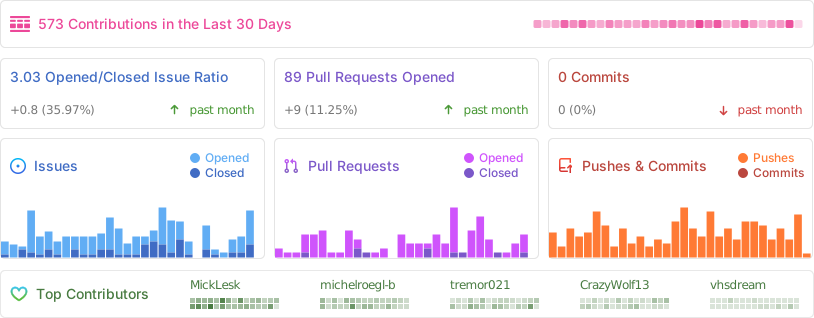
📈 Project Statistics
📜 License
This project is licensed under the MIT License - feel free to use, modify, and distribute.
Proxmox® is a registered trademark of Proxmox Server Solutions GmbH