 CanbiZ (MickLesk)
21d09cfb17
CanbiZ (MickLesk)
21d09cfb17
* feat(workflow): add GitHub-based versions.json updater

Replaces newreleases.io with direct GitHub API queries.
Extracts repos from fetch_and_deploy_gh_release calls in install scripts.
Runs 2x daily (06:00 and 18:00 UTC).

* feat(workflow): extend version crawler with multiple sources

- Method 1: fetch_and_deploy_gh_release calls (direct)
- Method 2: GitHub URLs extracted from all scripts
- Method 3: VM image sources (HAOS)
- Method 4: Docker Hub / GHCR versions
- Method 5: npm Registry versions

Also tries tags fallback when no releases exist.

* feat(workflow): rewrite with version-sources.json config

- Generates version-sources.json with structured metadata
- Each entry has: slug, type, source, script, version, date
- Extracts from: fetch_and_deploy_gh_release, GitHub URLs, npm, Docker
- Generates versions.json for backward compatibility
- Fully automatic, no manual mapping needed

* feat(workflow): add manual GitHub mappings and pveam support

- Method 5: Manual GitHub mappings for 36 apt-based apps
  (grafana, redis, postgresql, mariadb, influxdb, etc.)
- Method 6: Proxmox LXC templates (debian, ubuntu, alpine)
  via download.proxmox.com index
- Method 7: Special sources (HAOS VM)

Total coverage: ~310+ apps

* feat(workflow): expand manual GitHub mappings to 75 apps

Added mappings for:
- Apache projects (cassandra, couchdb, guacamole, tomcat)
- Media apps (tdarr, unmanic, shinobi)
- DevOps (coolify, dokploy, runtipi, sonarqube)
- Databases (mongodb, mysql, neo4j, rabbitmq)
- And 30+ more apps

Total manual mappings: 75

* feat: add manual placeholders for 34 unknown-source apps

- Added 34 apps with 'manual:-' type for apps without known sources
- Added manual type handler in version-fetch (returns '-' placeholder)
- Added manual counter to summary output
- Coverage now 100% (all 405 scripts included)

Manual entries can be updated later when sources are discovered.

* Refactor and update GitHub workflow files

Moved several workflow files to a 'bak' backup directory and renamed 'close-ttek-issues.yaml' to 'close-tteck-issues.yaml'. Refactored 'update-versions-github.yml' to focus on extracting and updating GitHub versions, simplified the extraction logic, and updated the workflow schedule to run four times daily. Minor variable and logic improvements were made in 'close-discussion.yml'.

* clean file

* chore: empty versions.json for workflow test

Proxmox VE Helper-Scripts
A Community Legacy in Memory of @tteck






Simplify your Proxmox VE setup with community-driven automation scripts
Originally created by tteck, now maintained and expanded by the community

🎯 Key Features
⚡ Quick SetupOne-command installations for popular services and containers |
⚙️ Flexible ConfigSimple mode for beginners, advanced options for power users |
🔄 Auto UpdatesKeep your installations current with built-in update mechanisms |
🛠️ Easy ManagementPost-install scripts for configuration and troubleshooting |
👥 Community DrivenActively maintained with contributions from users worldwide |
📖 Well DocumentedComprehensive guides and community support |
🔒 SecureRegular security updates and best practices |
⚡ PerformanceOptimized configurations for best performance |
📋 Requirements
🖥️ Proxmox VEVersion: 8.4.x | 9.0.x | 9.1.x |
🐧 Operating SystemDebian-based with Proxmox Tools |
🌐 NetworkInternet connection required |
📥 Getting Started
Choose your preferred installation method:
Method 1: One-Click Web Installer
The fastest way to get started:
- Visit helper-scripts.com 🌐
- Search for your desired script (e.g., "Home Assistant", "Docker")
- Copy the bash command displayed on the script page
- Open your Proxmox Shell and paste the command
- Press Enter and follow the interactive prompts
Method 2: PVEScripts-Local
Install a convenient script manager directly in your Proxmox UI:
bash -c "$(curl -fsSL https://raw.githubusercontent.com/community-scripts/ProxmoxVE/main/ct/pve-scripts-local.sh)"
This adds a menu to your Proxmox interface for easy script access without visiting the website.
📖 Learn more: ProxmoxVE-Local Repository
💬 Join the Community
💬 DiscordReal-time chat, support, and discussions 
|
💭 DiscussionsFeature requests, Q&A, and ideas 
|
🐛 IssuesBug reports and issue tracking 
|
🛠️ Contribute
💻 CodeAdd new scripts or improve existing ones |
📝 DocumentationWrite guides, improve READMEs, translate content |
🧪 TestingTest scripts and report compatibility issues |
💡 IdeasSuggest features or workflow improvements |
👉 Check our Contributing Guidelines to get started
❤️ Support the Project
This project is maintained by volunteers in memory of tteck. Your support helps us maintain infrastructure, improve documentation, and give back to important causes.
🎗️ 30% of all donations go directly to cancer research and hospice care

Every contribution helps keep this project alive and supports meaningful causes
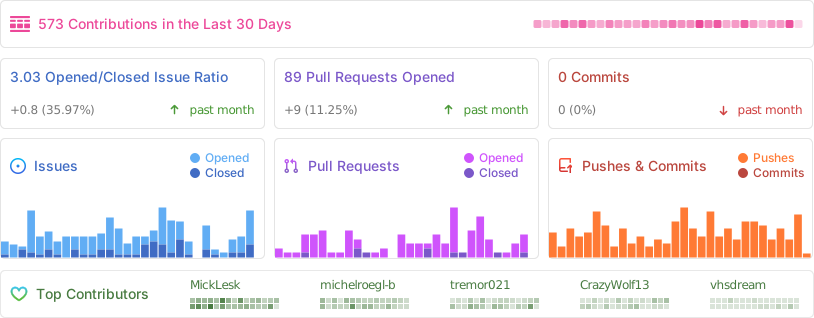
📈 Project Statistics
📜 License
This project is licensed under the MIT License - feel free to use, modify, and distribute.
Proxmox® is a registered trademark of Proxmox Server Solutions GmbH