 Tim Moore
03edfcef85
Tim Moore
03edfcef85
* fix(bazarr): store data in /var/lib/bazarr instead of inside /opt/bazarr

The installer creates /var/lib/bazarr and update_script() uses it as the
"is Bazarr installed" guard, but nothing pointed Bazarr at it. Bazarr
defaults its data directory to <install dir>/data, resolved from its own
source file rather than WorkingDirectory, so a stock container kept
config/ db/ backup/ cache/ log/ restore/ in /opt/bazarr/data - the
directory fetch_and_deploy_gh_release redeploys over - while
/var/lib/bazarr stayed empty.

Pass -c /var/lib/bazarr in the unit, matching the -data= flag the other
*arr scripts use. bazarr.py re-execs its child with sys.argv[1:], so the
flag survives the restart Bazarr performs while loading its config.

update_script() gains a one-time migration for existing installs. It runs
outside the release check so containers already on the latest version are
migrated too, is skipped when the unit already names a data directory,
refuses (before stopping the service) when both locations hold data, and
copies before removing so a failed migration leaves the original database
in place.

Fixes #16097

* fix(bazarr): drop explanatory comments per review

Proxmox VE Helper-Scripts
One-command installations for services, containers, and VMs on Proxmox VE
A community project — built on the foundation of @tteck's original work





What is this?
Simplify your Proxmox VE setup with community-driven automation scripts.
Install and configure popular self-hosted services with a single command — no manual package hunting, no config file archaeology. Paste a command into your Proxmox shell, answer a few prompts, and your container or VM is up and running.
The collection covers hundreds of services across categories like home automation, media servers, networking tools, databases, monitoring stacks, and more.
Requirements
| Component | Details |
|---|---|
| Proxmox VE | Version 8.4, 9.0, 9.1, or 9.2 |
| Host OS | Proxmox VE (Debian-based) |
| Access | Root shell access on the Proxmox host |
| Network | Internet connection required during installation |
Getting Started
The fastest way to find and run scripts:
- Go to community-scripts.org
- Search for the service you want (e.g. "Home Assistant", "Nginx Proxy Manager", "Jellyfin")
- Copy the one-line install command from the script page
- Open your Proxmox Shell and paste it
- Choose between Default or Advanced setup and follow the prompts
Each script page documents what the container includes, default resource allocation, and post-install notes.
How Scripts Work
Every script follows the same pattern:
Default mode — Picks sensible resource defaults (CPU, RAM, storage) and asks only the minimum required questions. Most installs finish in under five minutes.
Advanced mode — Gives you full control over container settings, networking, storage backends, and application-level configuration before anything is installed.
After installation, each container ships with a post-install helper accessible from the Proxmox shell. It handles common tasks like:
- Applying updates to the installed service
- Changing application settings without manually editing config files
- Basic troubleshooting and log access
What's Included
The repository covers a wide range of categories. A few examples:
| Category | Examples |
|---|---|
| Home Automation | Home Assistant, Zigbee2MQTT, ESPHome, Node-RED |
| Media | Jellyfin, Plex, Radarr, Sonarr, Immich |
| Networking | AdGuard Home, Nginx Proxy Manager, Pi-hole, Traefik |
| Monitoring | Grafana, Prometheus, Uptime Kuma, Netdata |
| Databases | PostgreSQL, MariaDB, Redis, InfluxDB |
| Security | Vaultwarden, CrowdSec, Authentik |
| Dev & Tools | Gitea, Portainer, VS Code Server, n8n |
Browse the full list at community-scripts.org/categories — new scripts are added regularly.
Contributing
This project runs on community contributions. Whether you want to write new scripts, improve existing ones, or just report a bug — every bit helps.
Where to start
| I want to… | Go here |
|---|---|
| Add a new script | ProxmoxVED — new scripts are tested here first |
| Fix or improve an existing script | Contributing Guidelines — open a PR in this repo |
| Report a bug or broken script | Issues |
| Request a new script or feature | Discussions |
| Report a security vulnerability | Security Policy |
| Get help or chat with other users | Discord |
Before you open a PR
- New scripts go to ProxmoxVED, not here. PRs with new scripts opened directly against this repo will be closed.
- Bug fixes and improvements to existing scripts belong in this repo — read the Contributing Guidelines first.
- Keep PRs focused. One fix or feature per PR.
- Document what your script installs and any non-obvious decisions in the corresponding JSON metadata file.
Core Team
 MickLesk |
 michelroegl-brunner |
 BramSuurdje |
 CrazyWolf13 |
 tremor021 |
 vhsdream |
 asylumexp |
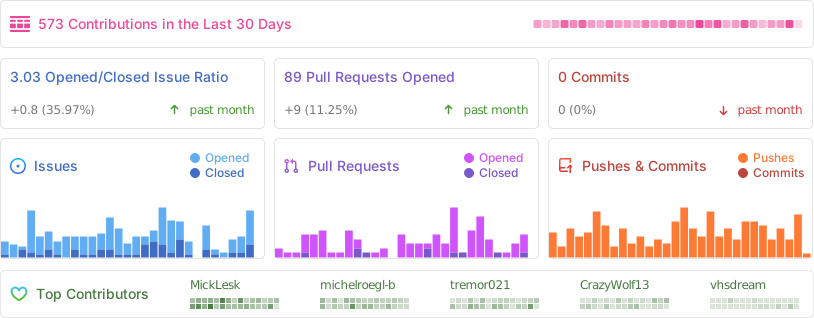
Project Activity
Support the Project
This project is maintained by volunteers. All infrastructure costs come out of pocket, and the work is done in people's spare time.
30% of all donations are forwarded directly to cancer research and hospice care — a cause that was important to tteck.


License
This project is licensed under the MIT License — free to use, modify, and redistribute for personal and commercial purposes.
See the full license text in LICENSE.
Maintained and expanded by the community · In memory of tteck
Proxmox® is a registered trademark of Proxmox Server Solutions GmbH